
What Is BPMN? Definition and How It Differs from Flowcharts
"BPMN — how is that any different from the flowcharts I already draw?" Ever spotted those four letters in a process document and quietly skimmed past them? You're not alone. That intimidating name makes a lot of people miss out on something genuinely useful.
Here's the good news. The name sounds formal, but the idea underneath is simple — and it can turn the everyday flowcharts you already draw into diagrams people actually understand. This guide walks through what BPMN really is, its five core elements, how it differs from an ordinary flowchart, the four steps to draw one, and a clear answer to the question everyone eventually asks: "So which one should I use?"
What you will learn
- The definition of BPMN — the OMG international standard (BPMN 2.0)
- The 5 core elements: events, activities, gateways, flows, and pools
- 3 practical differences between BPMN and simple flowcharts
- A simple rule for choosing between BPMN and a basic flowchart
What Is BPMN? The International Standard for Processes
BPMN (Business Process Model and Notation) is an international standard set of rules for turning business processes into diagrams. It was created by the Object Management Group (OMG), and the version in common use today is BPMN 2.0, released in 2011. It is also an international standard, published as ISO/IEC 19510.
In other words, BPMN is a kind of "universal language" for process diagrams — one where companies and tools all over the world use the same symbols to mean the same things.
Put even more simply: it's a process diagram where the meaning doesn't drift, no matter who draws it or who reads it. You know the moment when a diagram you worked hard on stalls a meeting with "wait, what does this part mean?" BPMN was created to kill that kind of rework at the notation level.
Why BPMN was created
Ordinary flowcharts tend to drift in style from one company or team to the next. The same diamond can mean different things to different people — and if you carry that ambiguity into system development or cross-team work, those small misreadings quietly turn into expensive rework.
BPMN exists to remove that ambiguity. It pins down the type and meaning of every symbol, one by one. That's exactly why it's trusted in situations where misunderstandings simply aren't allowed.
Where BPMN is used most
BPMN earns its keep wherever the accuracy of the diagram directly affects the quality of the result. Four common cases stand out.
- Requirements for system development: developers and business teams read the same diagram the same way
- Implementation in workflow/BPM systems: BPMN 2.0 has a format that execution engines can read directly
- Process reengineering (BPR) and compliance documentation: rigorous definitions that hold up to an audit
- Cross-department or cross-company process design: pools and lanes make the boundaries of responsibility clear
The flip side is just as important: when you don't need that level of rigor, a simple flowchart gets the message across faster. We'll draw that line carefully later in the guide.

Minami
Process improvement lead
Honestly, BPMN looks so full of jargon that I freeze up. Is it really okay for someone like me, working on the floor day to day?

Spark
DrillSpark consultant
You don't have to master all of it at once! Just take home one idea: it's a shared set of rules for removing ambiguity. That's enough to start.
The 5 Core Elements of BPMN: Events, Activities, Gateways
"Over 100 symbols" sounds daunting, I know. But relax — for real-world work, there are really only five core elements you need to learn first.
| Element | Shape | Meaning and use |
|---|---|---|
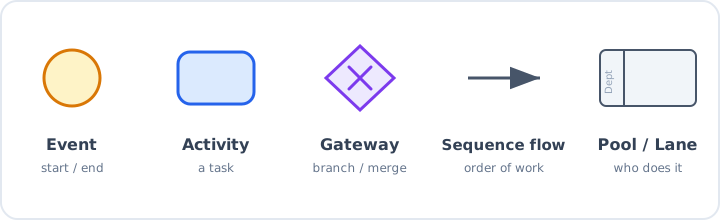
| Event | Circle | Something that happens at the start, middle, or end of a process. Start events use a thin line; end events use a thick one |
| Activity | Rounded rectangle | A task such as "create a quote" — the element you'll use most |
| Gateway | Diamond | Branching and merging. X means exclusive (one path only); + means parallel (run at the same time) |
| Sequence flow | Solid arrow | The order in which work is performed — the flow of the process itself |
| Pool / Lane | Container with dividers | Who does the work: companies, departments, and roles, shown through structure |
Events: make the start and end points explicit
An event is something that triggers or results from a process — "an order was received," "a timer expired," and so on. They resemble the start and end symbols in a flowchart, but BPMN goes further: the symbol itself tells you the kind of trigger, such as "starts on a received message" or "starts after a set time."
Gateways: distinguish the type of branch precisely
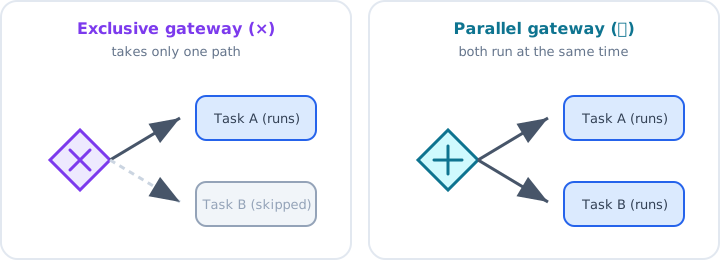
This is where BPMN really shines. A flowchart diamond lumps every kind of branch together, but a BPMN gateway distinguishes exclusive (one path only), parallel (run several at once), and inclusive (every path whose condition is met) using distinct symbols.
"Run the approval and the stock check at the same time" — being able to express parallel work like that clearly and without hesitation is a strength unique to BPMN.
Minami
Process improvement lead
Isn't a diamond just a fork in the road, though?
Spark
DrillSpark consultant
Telling exclusive (one path only) apart from parallel (at the same time) is BPMN's single biggest weapon! Nail just that, and even your everyday flowcharts get a lot more accurate.
Pools and lanes: show "who does it" through structure
A pool represents a company or organization; a lane represents a department or role inside it. The idea is the same as a swimlane flowchart, but BPMN even sets rules for how organizations interact — for example, an exchange that crosses pools is drawn with a message flow (a dashed arrow).
BPMN vs. Simple Flowcharts: 3 Differences
To get straight to the point: the biggest difference is whether the notation is rigorously fixed as an international standard. That single difference shows up in three practical ways.
| Aspect | BPMN | Simple flowchart |
|---|---|---|
| Notation rules | OMG international standard (BPMN 2.0); symbols mean the same thing worldwide | Some guidelines exist (e.g. JIS symbols), but in practice it's very flexible |
| What it can express | Parallel work, exception handling, even cross-organization messaging | Mostly sequential steps and simple branches |
| Audience and use | For engineers, BPM and process-design specialists | For the floor: internal sharing, handovers, training |
| Learning curve | Many symbols; takes some study to master | Know about four symbols and you can draw right away |
Difference 1: rigor of the notation
In BPMN, the shape, meaning, and combination of each symbol are defined by the spec, leaving almost no room for interpretation. An ordinary flowchart, by contrast, runs on "as long as the team gets it, it's fine" — and that looseness is exactly what makes it quick to draw. Neither is superior; they simply target different levels of precision.
Difference 2: the complexity it can express
Parallel work, interruptions when an exception occurs, message exchanges with another company's system — BPMN can draw these complex processes accurately. Try the same thing in a flowchart and you either drown it in annotations or leave the crucial parts vague.
Difference 3: audience and purpose
BPMN's main readers are IT teams and process designers; a flowchart's readers are coworkers on the floor and new hires. Here's the trap: if your readers don't know BPMN symbols, all that rigor doesn't reach them by even a millimeter. "Who will read this?" is the very first fork in the road when choosing a notation.
Spark
DrillSpark consultant
The thing to remember is who reads it. No matter how accurate the diagram, if the reader doesn't know the symbols, the message never lands. Keep that in mind and your misfires drop fast!
A BPMN-Style Example: Drawing an Order-to-Shipment Process
Theory alone won't make it stick. BPMN thinking applies directly to the flowcharts you draw every day, so let's sketch "order to shipment" while paying attention to the kinds of events and gateways involved.
Look at the parallel gateway in the middle. "Prepare shipment" and "issue invoice" don't have to happen in sequence, so they run at the same time and merge again at the end.
A purely sequential flowchart tends to miss this kind of "work that could run in parallel." Just being mindful of gateways makes wasted waiting time surface on its own.
Spark
DrillSpark consultant
Once you start spotting "hey, these could run at the same time," work speeds up fast. Think of the parallel gateway as a pair of time-saving glasses!
The BPMN points this example keeps in mind
- Make the start and end explicit with events (what kicks it off, and what marks it done)
- For branches, write whether it's exclusive or parallel
- Write activities as short phrases that start with a verb ("do X")

That said, you don't have to wrestle with symbols from the start. With DrillSpark's AI generation, you just describe the work in plain English — "after an order comes in, check stock; if it's out, order from the supplier; once allocated, prepare the shipment and issue the invoice in parallel" — and in about 30 seconds you get a draft flowchart like this one. It's free to try, so put it into shape first, before you start second-guessing.
Which Should You Use? A Practical Rule
The answer is simple: choose by reader and goal. Think it through with the three criteria below and most of the hesitation disappears.
Criterion 1: who is the reader
If your readers are coworkers on the floor or new hires, a simple flowchart is the right call. To someone who doesn't know BPMN symbols, an unfamiliar gateway actually gets in the way of understanding. If your readers are an IT team or an outside vendor, BPMN's rigor pays off instantly.
Criterion 2: will it feed system or automation work
If the diagram will feed implementation in a workflow system or BPM tool, BPMN is the first choice. BPMN 2.0 has a format that execution engines can interpret directly, so the diagram itself works as a design document.
Criterion 3: how much parallel work and how many exceptions
Several departments moving at once, frequent interruptions or send-backs when exceptions occur — for complex processes like these, BPMN's expressiveness is what you'll lean on. Conversely, for simple work that just runs step by step, a plain flowchart leaves you wanting for nothing.
| When this is the case | Recommended notation |
|---|---|
| Internal sharing, handovers, manuals | Simple flowchart |
| New-hire training or getting the team aligned | Simple flowchart |
| Implementation in a workflow system or BPM tool | BPMN |
| Designing complex cross-department or cross-company processes | BPMN |
When in doubt, start with a simple flowchart. If internal sharing is the goal, it's almost always enough. As you draw, if you ever think "I want to show this parallel work precisely," just bring in BPMN thinking for that part. Keep the first step as light as you can.
Spark
DrillSpark consultant
Rather than agonizing over the perfect notation, drawing your first one is the shortcut to getting it right! When unsure, start with the lighter option and add BPMN when you need it.
Summary: Just Drawing One Is the Real Shortcut
Key takeaways
- BPMN is the OMG international standard for business processes (BPMN 2.0)
- The core elements are events, activities, gateways, flows, and pools — five in all
- It differs from flowcharts in three ways: rigor of notation, expressiveness, and audience
- A simple flowchart is enough for internal sharing; reach for BPMN for system work or complex design
BPMN is a powerful standard, but you don't have to draw every process in it. What truly matters isn't agonizing over which notation to pick — it's drawing the process at all and making it visible. The moment steps that live only in your head become a diagram, the waste and the gaps all rise to the surface.
Still, freezing in front of a blank canvas is a common story — and that's exactly when DrillSpark steps in. Just describe the work you want to map in plain English, and the AI drafts a flowchart in about 30 seconds. Refine the parts you care about right there in conversation, and when you want to bring in BPMN thinking, add parallels and branches as you go.
No credit card required — it's free to start. Pick one familiar process, describe it to DrillSpark, and watch it become a diagram. That's the best place to begin.
Minami
Process improvement lead
You know what, I think I can actually do this. I'm going to try one with a process I already know!
Spark
DrillSpark consultant
That's the spirit! When in doubt, just draw one. I'm cheering on your "let's give it a go" any time.
Related Templates
Visualize your approval process from draft to final decision. Includes legal and finance review steps. Easy AI customization.
Visualize the end-to-end order-to-ship process. From order entry, inventory allocation, picking, inspection to shipping. AI-powered customization for manufacturing.
Visualize the loan review process from application, credit assessment, approval, disbursement to monitoring. AI-powered banking workflow templates.