Business process mapsthat don't end up in a drawer.
Build flows with AI. Refine with your expertise. Spot issues. Get improvement suggestions — all in one tool.
40+ industry templates, AI-generated in ~30 seconds on average
Pain
Sound familiar?
Created but unused
Hours spent on a flow diagram, only for the team to say 'too complicated to follow.'
Drifts from reality
Exception rules and workarounds missing — you had to start over.
Outdated by next month
30 minutes adjusting arrows in PowerPoint. By next month, already stale.

Process diagrams aren't the goal. Understanding and improving the process is.
How It Works
From visualization to improvement in 4 steps
DrillSpark isn't a tool for making pretty diagrams. It's a tool for understanding and improving your business.
Build with AI
AIJust describe the process. AI generates a professional flowchart in seconds.
Refine with expertise
HumanEdit in table format like Excel. Add exception rules and tacit knowledge.
Discover issues
HumanDrill down to organize complex processes hierarchically. Spot bottlenecks at a glance.
AI suggests improvements
AI'This approval step can be automated.' 'These branches can be merged.' — AI proposes specific improvements.
Use Cases
Built for your workflow

Complete process flows during client interviews
Just talk to AI during hearings. "Walk me through your expense approval flow" — those words become a flowchart instantly.
Review and refine in real-time with the client. "We need director approval here" → add it instantly in table view.
The agreed diagram is your deliverable. No more going back to redraw.

Design docs that never go stale
Generate flow drafts with AI, refine in table format. Export as Mermaid.js to embed directly in GitHub, Notion, or Confluence.
Version control flows like code. When specs change, the diagram updates too.
Structurally prevent drift between design docs and code.
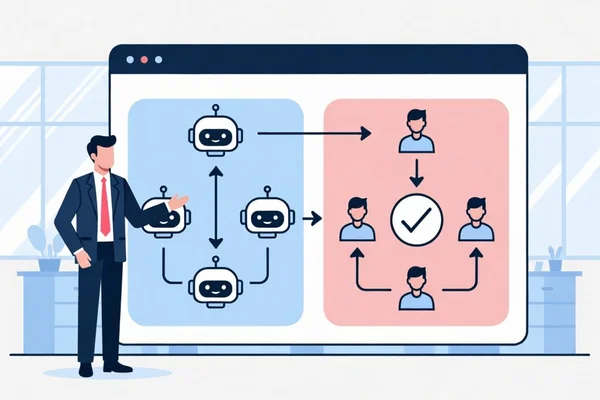
Agree on what AI handles — on a diagram
Just say "split inquiry handling between AI agents and humans." AI first response, human approval, and escalation land in one lane-separated diagram.
How far AI goes and where humans decide — the boundary that talks alone never settle gets decided on the diagram.
Your proposal deck and team rollout both start from this one page.
Proof
Already in use on real teams
30s
average AI generation time
40+
industry templates
Our workflow, which we'd been running on gut feel, finally became visible — and we could see exactly what to improve. Now we hand the workflows we build to AI to streamline our video production.

Features
3 features that take you from visualization to improvement
AI builds the draft, humans refine it, AI suggests improvements
Beyond diagramming. AI suggests how to improve.
Just describe the process to generate a flowchart. Then AI suggests specific improvements: 'This approval step can be automated.' 'These branches can be merged.'
Organize complex processes in layers
Click 'Consideration' to expand its sub-flow. Complex processes that don't fit on one page stay readable with hierarchical drill-down.
Anyone can edit. Use anywhere.
Edit in table format like Excel. Consultants and field staff update flows without technical knowledge. Export as Mermaid.js to embed in GitHub, Notion, or Confluence.
More Features
Even More Powerful Features
Manage complex processes, simply
PowerPoint Export
Convert flowcharts to PPTX. Reports and presentations in one click.
40+ Industry Templates
Manufacturing, Finance, Retail, IT, and more. Pick a template and start instantly.
Cloud Sync & Share
Save diagrams safely in the cloud. Share with clients or team via a single URL.
Version History
Revert to past versions instantly. Experiment freely without fear.
Before / After
What changes vs. the old way
FAQ
Frequently Asked Questions
Pricing
Simple, Transparent Pricing
Start free, upgrade when you need. No hidden fees.
Free
- 5 AI generations/month
- Up to 3 projects
- 20 nodes limit
- Unlimited manual editing
- Web Share & Publish
- 40+ industry templates
Starter
- 50 AI generations/month
- Up to 100 projects
- 1,000 nodes limit
- Team features
- Web Share & Publish
- Excel import/export
Pro
- 250 AI generations/month
- Up to 300 projects
- 5,000 nodes limit
- Team features
- PowerPoint export
- SVG export
- JSON import/export
Enterprise
Looking for a team or enterprise solution? We offer custom plans with dedicated onboarding support.
Need more credits?
Buy additional credit packs anytime from the editor.
Ready for your next interview, your next design doc?
Sign up in 30 seconds. AI builds your first flowchart.